When Should You Use a Sealed Class in Kotlin?
What a sealed class is, where its subclasses are allowed to live, why when needs no else, and how to choose between a sealed class and a sealed interface.
In short: a sealed class (or sealed interface) is a type with a closed list of subtypes. The compiler knows all of them, so a
whenover it can check that you handled every case. Its direct subtypes must live in the same module and the same package.
Three fields can describe a screen. They can't stop it from being in two states at once.
Your order screen state starts as three fields: isLoading, error and order. One day a bug report shows a spinner and an error message on the screen at the same time. Nothing in the types stopped isLoading = true and error = "Timeout" from being set together.
A sealed type fixes this kind of bug by making the wrong mix impossible to write. This post covers what a sealed class is and who can extend it. It also shows when to pick a sealed class or a sealed interface.
What is a sealed class in Kotlin?
A sealed class is a class with a fixed list of subclasses. You write the subclasses, and nobody else can add more. A sealed interface is the same idea for an interface.
Think of it this way:
- A regular
openclass: anyone, in any module, can add a new subclass later. - A sealed class: the list of subclasses is fixed when your module compiles. Nobody outside can add to it.
sealed interface OrderUiState {
    data object Loading : OrderUiState
    data class Ready(val items: List<CartItem>, val total: Int) : OrderUiState
    data class Failed(val message: String) : OrderUiState
}
The screen is in exactly one of these states. Loading has no data, Ready has the items, Failed has the message. You can't build a state that is loading and failed at the same time, because no such type exists.
A few rules from the Kotlin docs:
- A sealed class is abstract. You can create its subclasses, never the sealed class itself.
- Its constructors can only be
protected(the default) orprivate. Apublicone fails with "Constructor must be private or protected in sealed class". - A subclass can be a
data class, adata object, a plain class, or another sealed class.
Why doesn't when need an else branch?
This is the main reason to use a sealed type. The compiler knows every subtype, so it checks that your when covers all of them:
fun title(state: OrderUiState): String = when (state) {
    OrderUiState.Loading -> "Loading"
    is OrderUiState.Ready -> "Your order (${state.items.size} items)"
    is OrderUiState.Failed -> "Something went wrong"
}
Inside is OrderUiState.Ready ->, Kotlin already knows state is Ready, so state.items works without a cast. This is the same smart cast you get after a null check.
Now add a fourth state, Cancelled. Every when that doesn't handle it stops compiling:
'when' expression must be exhaustive. Add the 'is Cancelled' branch or an 'else' branch.
The compiler gives you a to-do list of every place that needs a decision. This also works for a when statement, not only for a when whose result you use. It became an error in Kotlin 1.7, as planned in the 1.6 notes.
Why is else almost right?
Have you ever added a new state and found a screen that silently ignored it? The error message above offers an else branch as a fix. It works, but it switches off the check you wanted:
// Almost right: compiles today, hides tomorrow's state
fun title(state: OrderUiState): String = when (state) {
    is OrderUiState.Ready -> "Your order"
    is OrderUiState.Failed -> "Something went wrong"
    else -> "Loading"
}

// Right: every state by name, no else
fun title(state: OrderUiState): String = when (state) {
    OrderUiState.Loading -> "Loading"
    is OrderUiState.Ready -> "Your order"
    is OrderUiState.Failed -> "Something went wrong"
}
Both versions work with three states. Add data class Cancelled(val reason: String) and the first one still builds. A cancelled order now shows "Loading" forever, and nothing warns you. The second one fails to build until you decide what a cancelled order should show.
Keep else for subjects that are really open, like a String or an Int. On a sealed type, list the cases.
Where can the subclasses of a sealed class live?
The rule: direct subclasses must be in the same module and the same package as the sealed type. They can be top-level or nested, in any file. On Kotlin 2.4.21 the compiler reports:
- Same package, another file, same module: allowed.
- Another package, same module: "A class can only extend a sealed class or interface declared in the same package."
- Another module, even with the same package name: "Extending sealed classes or interfaces from a different module is prohibited."
- A local class or an anonymous object: "Local class cannot extend a sealed interface." Subclasses need a proper name.
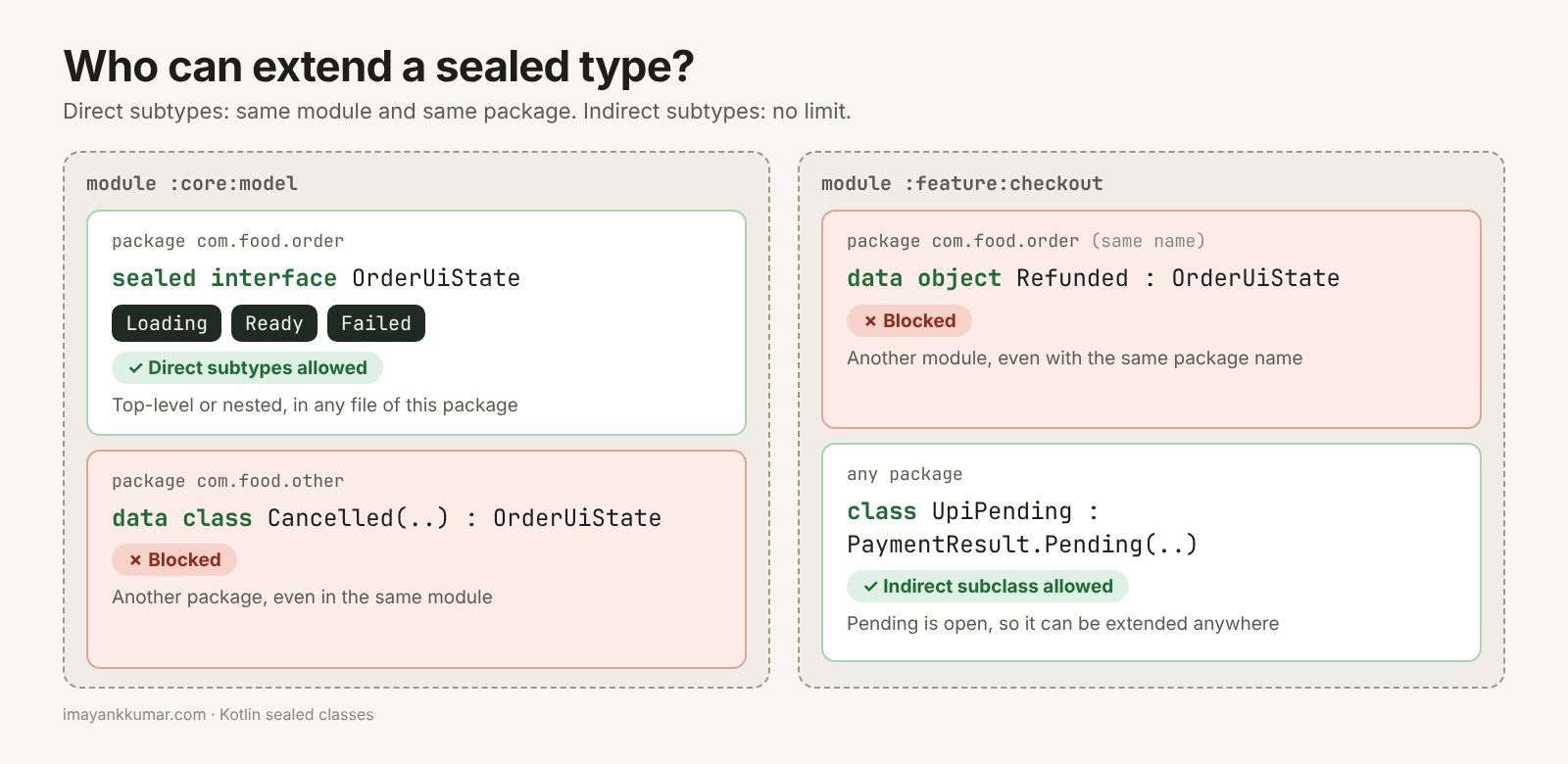
In a multi-module Android app this matters. If OrderUiState lives in :core:model, all its direct states must live there too. A :feature:checkout module can use them and when over them, but can't add a new one. That is also why a library can expose a sealed type safely: apps read it, but can't extend it.
Older answers often say "same file". That was the rule before Kotlin 1.5, which moved it to package and module and also added sealed interfaces.
What about indirect subclasses?
The rules above apply only to direct subclasses. If a direct subclass is open instead of sealed, anyone can extend it, even from another module:
sealed class PaymentResult(val orderId: String) {
    class Paid(orderId: String, val receiptUrl: String) : PaymentResult(orderId)
    class Declined(orderId: String, val reason: String) : PaymentResult(orderId)
    open class Pending(orderId: String) : PaymentResult(orderId)
}

// In another module: allowed, because Pending is open
class UpiPending(orderId: String) : PaymentResult.Pending(orderId)
A when on PaymentResult is still exhaustive. The is PaymentResult.Pending branch also covers UpiPending, because a UpiPending is a Pending. What you lose is a closed list of the kinds of pending. If you want the list closed all the way down, make Pending sealed too.
Sealed class or sealed interface?
Both give you a closed list and an exhaustive when. The difference is what you can put in the parent and how many parents a type can have.
- Sealed class: can have a constructor and state. In
PaymentResultabove, every result getsorderIdfrom the parent. A class can extend only one class, so a type belongs to one sealed class hierarchy. - Sealed interface: no constructor or stored state. A class can implement many interfaces, so one type can be part of two closed lists. An
enumcan implement a sealed interface, but can't extend a sealed class.
sealed interface CartEvent
sealed interface AnalyticsEvent

data class ItemAdded(val name: String) : CartEvent, AnalyticsEvent
enum class SortOrder : CartEvent { PRICE, RATING }
ItemAdded is in both lists. The same-module and same-package rule still applies to each interface, so ItemAdded has to live next to both of them.
A simple default: use a sealed interface for UI state and events. Use a sealed class when every subtype needs the same constructor data, like orderId.
Sealed class vs sealed interface: quick comparison
| Sealed class | Sealed interface | |
|---|---|---|
| Closed list of subtypes | Yes | Yes |
Exhaustive when |
Yes | Yes |
| Constructor and stored state | Yes | No |
| A type can be in two lists | No | Yes |
An enum can join |
No | Yes, by implementing it |
| Where subtypes can live | Same module and package | Same module and package |
| Good for | Results with shared fields, like orderId |
UI state, events |
Frequently asked questions
Can a data class extend a sealed class? Yes. A data class can't be sealed itself. But it can extend a sealed class or implement a sealed interface. Most UI states are written this way. The data class post explains what data adds, and why data object prints a readable name.
Is adding a new subclass a breaking change? For every when without else, yes, and that is the point. For a public library it means callers must update their code, so add new cases with care.
Should I use a sealed class or an enum? Use an enum when every case is a single fixed value with the same properties, like SortOrder.PRICE. Use a sealed type when cases carry different data, like Failed("Timeout"). I'll cover enums in detail in a later post.
How is this different from sealed classes in Java? Java added sealed classes in Java 17, where you list the allowed subclasses with permits. Kotlin has no permits list: the compiler finds the subclasses in the same package and module.
What should you remember?
A sealed type turns "all the states this screen can be in" into a list the compiler checks for you. Direct subtypes stay in one module and one package. Indirect ones can live anywhere. And an else on a sealed when throws away the check.
If you want to test yourself, try the sealed class interview questions. This post is the fourth topic in Stage 1 of my Android roadmap.
Is there an else -> on a sealed type in your codebase right now?
This post first appeared on imayankkumar.com, where you'll find new posts first.
About the author
- I'm Mayank, an Android engineer focused on Kotlin, software architecture, performance engineering, and AI-assisted development. I write about building Android apps with AI, including the experiments that don't work.
Comments
Join the discussionNo comments yet. Be the first to comment.